
Hotel Search Engine

Enter Destination

Check in - Check out

2 Guests

2 adults,0 children,1 room

Adults

2

Children

0

Rooms

1
Update Search

Book Your Room

Live nearby hotel search

Find Hotel Deals

Search any hotel, landmark, address or place and compare live rates.

AI travel technology · Developer integration guide

BusinessHotels MCP: Live Hotel Rates API for AI Agents & Developers

Connect AI agents to real-time named-hotel rates and a direct booking handoff through one universal endpoint. Learn the current MCP and REST integration, request schema, live response validation, error handling and international hotel matching. Built for travel assistants, developers and applications that need current stay totals rather than estimated prices.

Explore API & Try the Live Examples →
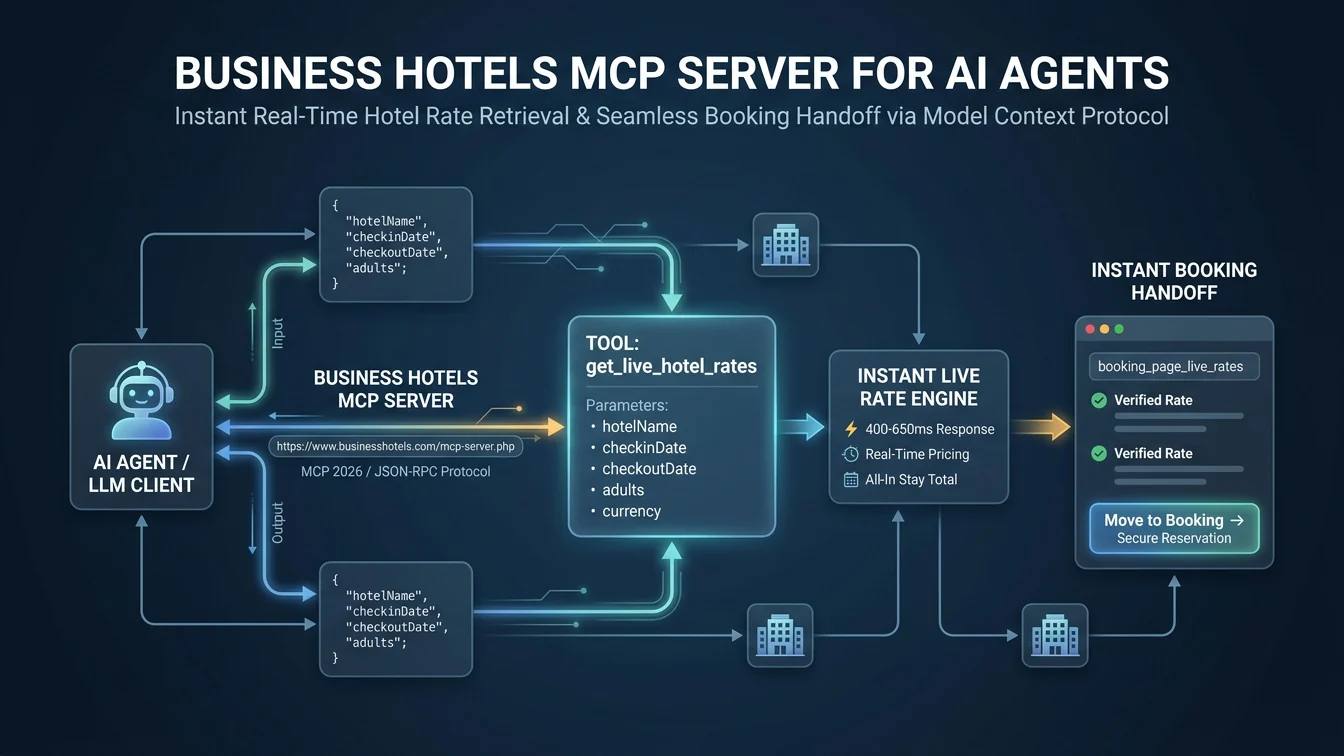
Illustrative architecture of BusinessHotels MCP hotel rate retrieval and booking handoffBusinessHotels MCP architecture Open developer configuration →
Conceptual illustration, not a protocol specification or a guarantee of independently verified rates. Use the current contract for exact request and response fields.
One universal endpoint

Give your AI agent access to live hotel rates

https://www.businesshotels.com/mcp-server.php

Native MCP and RESTExact stay totalsDirect booking handoff
Open Tool Configuration →

One compatible endpoint

Discover and call the named-hotel rate tool from authorized AI hosts or HTTP applications.

Validation first

Check the hotel, location, exact stay, currency, price and booking URL before presentation.

479 ms measured mean

Five successful REST quotes in the November 28, 2026 regression run; performance varies.

What is the BusinessHotels MCP server?

BusinessHotels.com provides a machine-readable interface that lets AI assistants, travel agents and developer applications request a live rate for a specific named hotel. The Model Context Protocol (MCP) gives a compatible AI host a standard way to discover and invoke that tool. A direct REST interface is available on the same server for applications that use HTTP or function calling instead of an MCP client.

The service is designed for the moment when a traveler already knows a hotel or an application has identified one through a separate search. Instead of relying on a price mentioned in an old article, a search-engine snippet or a language model’s training data, the application can ask for a fresh quote for the exact property, arrival date, departure date, number of adults and currency. The result can include a full-stay total and a direct booking handoff to BusinessHotels.com.

This is not a general-purpose destination search API, an autonomous payment API or a promise of the lowest rate across every marketplace. The current tool resolves one named property per request. If someone asks for hotels near an airport, conference venue or railway station, use a discovery experience such as the AI Hotel Finder to identify candidates, then query named hotels when appropriate. Keeping discovery, quoting and booking distinct makes an agent easier to test and reduces unintended substitutions.

Quick start: the canonical universal endpoint

All platforms should use the same canonical server rather than constructing a platform-specific PHP filename. Native MCP clients can discover the current tool schema with tools/list and invoke it with tools/call. The server documentation identifies MCP 2026-07-28 as its current modern protocol and also describes supported legacy versions. Use the host’s documented transport and negotiation process; do not assume that every agent runtime uses the same headers or initialization flow.

IntegrationCanonical value
MCP endpointhttps://www.businesshotels.com/mcp-server.php
Tool nameget_live_hotel_rates
REST executionPOST /mcp-server.php?route=tools/get_live_hotel_rates
API / server version1.4.2
Documentation release2026.11.28.1 · November 28, 2026
Tool discoveryNative tools/list; consult current configuration for protocol-specific details

Start here: Complete tool configuration and executable Python, JavaScript and PHP examples. The guide you are reading is an integration overview; the master machine-readable contract is the source of truth for the current documentation release.

Applications need an authorized MCP connection or an HTTP executor that is permitted to reach the service. Reading this article or the OpenAPI schema does not, by itself, grant an AI model the ability to send requests. If the host cannot connect, explain that limitation and provide the manual finder or developer configuration link. Do not present an invented result as a live hotel quote.

How the live hotel rate workflow works

A useful agent architecture separates the user’s intent from network execution and response validation. First collect the information that is necessary to identify a hotel and its stay. Then call the tool, inspect both transport and application-level results, and confirm that the quoted property and stay correspond to the original request. Present the returned full-stay price only when the checks pass.

  1. Resolve the hotel. Collect the full property name, city, country code and state or region if known.
  2. Resolve the stay. Confirm arrival, departure, adults and currency without silently changing the traveler’s choices.
  3. Execute the live lookup. Discover the current schema and make a named-hotel call through MCP or REST.
  4. Validate the response. Check identity, geography, dates, occupancy, currency, rate and booking URL.
  5. Present and hand off. Show the matched hotel, address, dates, total and original booking link together. The traveler reviews the booking page and approves any purchase.

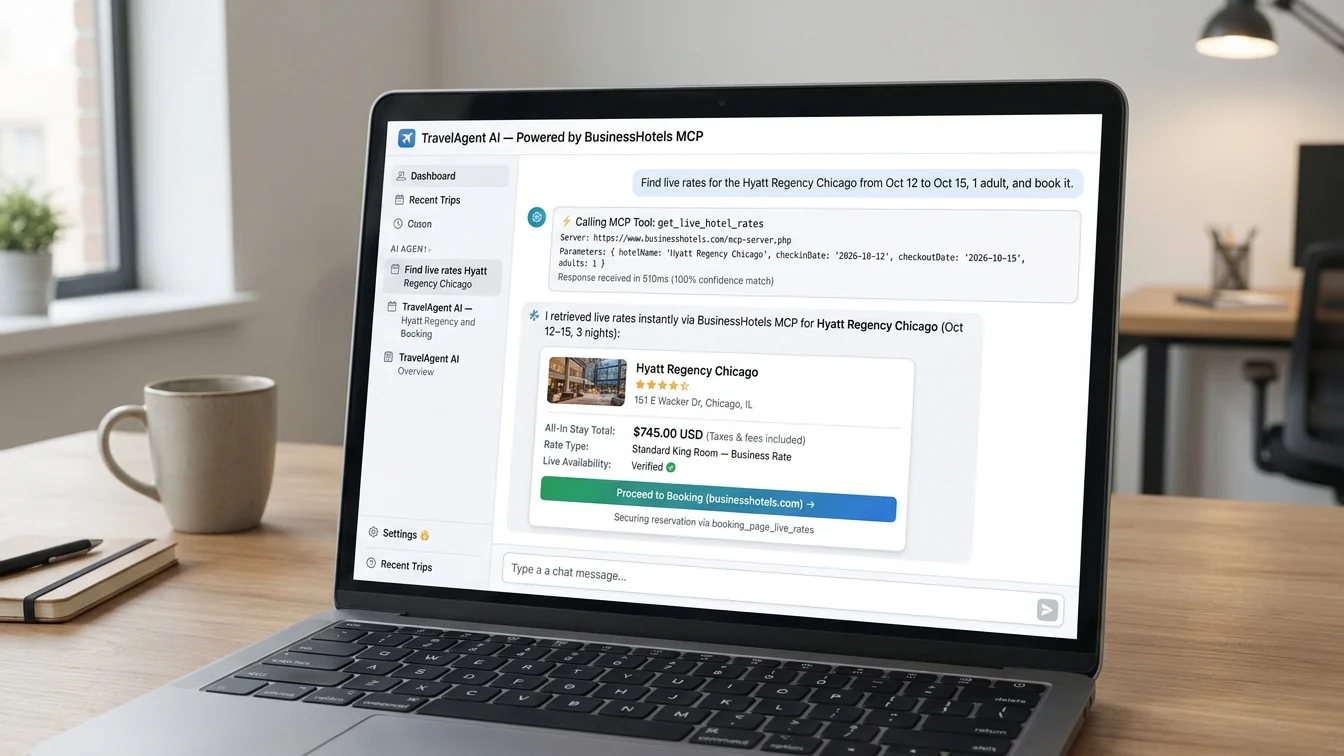
For example, a business traveler may need the Hyatt Regency Chicago for a conference. The agent should not treat every hotel containing the words “Hyatt” and “Chicago” as equivalent. Once the correct hotel is identified, a validated quote can be shown with the booking link. If the hotel cannot be confidently matched, the agent should ask for the full address rather than silently replacing the property with another hotel.

Illustrative AI travel assistant displaying a named hotel and booking handoff
Illustrative AI agent interface only. Screen dates, price, room type and verification labels are mock content, not a live response or supported room-level guarantees.

Request schema: hotel identity, dates, guests and currency

The current tool accepts a single hotel name string with its geographic context. Provide three comma-separated fields where no state is required, or four where a region is relevant. For example, Hilton Tokyo, Tokyo, JP and Wynn Las Vegas, Las Vegas, NV, US are both valid request forms. Do not invent a state for Singapore, Monaco or Tokyo just to satisfy a client-side parser.

InputMeaning and constraints
hotelNameRequired. Property name, city, optional region, two-letter country code in one string.
checkinDateRequired. Destination-local calendar date, YYYY-MM-DD; not in the past.
checkoutDateRequired. Calendar date strictly after arrival.
adultsInteger 1–4; defaults to 2 only when not specified.
currencyThree uppercase letters; defaults to USD only when unspecified.
api_keyOptional legacy input; prefer the authorized X-API-KEY header for direct callers.

Explicit dates are calendar dates, not timestamps. If the traveler says December 20 to December 22, pass those dates unchanged. If the traveler says “tonight” or “next Friday,” first resolve the intended date in the hotel’s local timezone. A UTC conversion must not move the traveler’s arrival forward or backward by a day. Validate that checkout is later than check-in.

Children, child ages and number of rooms are not accepted inputs in the current tool. Five adults must not be reduced to four to force a quote. If the request exceeds supported occupancy or requires a particular room configuration, explain the limitation and direct the traveler to a booking flow that can handle the requirement.

{
  "hotelName": "Hilton Tokyo, Tokyo, JP",
  "checkinDate": "2026-12-20",
  "checkoutDate": "2026-12-22",
  "adults": 3,
  "currency": "JPY"
}

Illustration only: replace the example dates with the traveler’s actual future dates before execution. This JSON describes an input, not a live rate.

Native MCP integration for AI agents and developers

Use a compatible client to connect to the canonical endpoint. Discover the tool through native tools/list instead of depending on an old connector registration or a hard-coded schema copied from another platform. The current discovery response describes the tool name and its supported arguments, including the adult occupancy maximum.

The documented modern stateless protocol requires routing headers that correspond to the JSON-RPC operation: MCP-Protocol-Version, Mcp-Method and, for tool calls, Mcp-Name. The request metadata must correspond to the selected protocol; native clients may manage those fields. See the current configuration page for the exact executable envelopes, headers and legacy-client examples. Header-omission behavior was not independently tested in the published regression suite.

When invoking tools/call, pass the tool name get_live_hotel_rates and place the hotel request in the tool arguments. Inspect JSON-RPC errors and the tool result’s isError indicator before consuming structuredContent or a JSON text result. A successful transport does not guarantee that a hotel rate exists. After unwrapping the result, apply the same validation rules used for REST responses.

Developer workstation illustrating MCP client configuration and hotel-rate integration
Illustrative developer workstation. Code and values shown on the screens are conceptual graphics; use the linked documentation for tested examples.

REST and function-calling integration

For a server-side application or an agent with a permitted HTTP tool, the REST route accepts a JSON POST body with the same input fields. Send Content-Type: application/json and use the authorized key configuration described in the developer guide. Keep any nonpublic credentials on the server side, avoid writing authorization headers or booking tokens into analytics logs, and set a finite timeout.

The following example demonstrates the transport only. It expects a JSON request body on standard input and a configured environment variable. It deliberately does not print a quote or booking link: applications must validate all response fields before displaying either. The full, ready-to-use validating examples are in the official configuration page.

import json, os, sys
from urllib.request import Request, urlopen
from urllib.error import HTTPError

url = ("https://www.businesshotels.com/mcp-server.php"
       "?route=tools/get_live_hotel_rates")
args = json.load(sys.stdin)  # Exact traveler inputs
req = Request(url, data=json.dumps(args).encode("utf-8"),
              headers={"Content-Type": "application/json",
                       "X-API-KEY": os.environ["BH_API_KEY"]},
              method="POST")
try:
    with urlopen(req, timeout=20) as response:
        result = json.load(response)
    # Apply full identity, stay, rate and URL validation here.
    print("Received response; validate before presenting.")
except HTTPError as error:
    print("HTTP error:", error.code, file=sys.stderr)
    # Inspect structured error internally; do not quote a rate.

Production clients should also handle timeouts, invalid JSON and connection errors separately. An HTTP error is not a statement about room availability. When a transient error occurs, retry the original request with bounded backoff; avoid infinite retry loops or changing the dates as a recovery strategy. Honor HTTP 429 and any Retry-After header. The service’s fixed concurrency limit has not been established by the regression tests.

Validate the hotel, stay and full-stay total

A hotel matching score measures the strength of a match; it is not independent proof that the returned property is the one requested. Compare the actual name, city, country and any requested state or address. In the current documentation, a score above 0.85 may proceed only after independent identity checks; a score from 0.60 to 0.85 requires confirmation, while lower or missing scores require clarification. A wrong city or state is not acceptable even when the name is identical.

International naming differences must be handled deliberately. GB and UK are equivalent for this service’s country validation. Monaco and Monte Carlo or Monte-Carlo are accepted city aliases only within country MC. A requested state must still match; an absent state is acceptable only when the traveler did not specify one. Do not remove all geographic checks to make a difficult property resolve.

Response fieldWhat to verify
statusSUCCESS for a bookable quote; RATE_UNAVAILABLE is a distinct result.
hotel_id and identityHotel name, address and geography must match the request.
stayExact check-in, checkout, adults, children (0 in current calls) and currency.
stay_verificationrequest_only or upstream_dates_echoed; see limits below.
rates.display_all_in_totalPositive, finite full-stay total in the returned currency.
best_match_scoreCheck confidence as well as identity; not proof on its own.
booking_page_live_ratesOriginal booking URL; verify property ID, country, dates, adults, currency and nonempty token.

Validate numeric formatting before removing commas. A valid grouping such as 4,953.75 is not the same as the ambiguous string 333,56. Reject malformed prices instead of converting them into another number. Compare totals only after checking that they represent the same stay and currency. Do not infer the room type, room count, cancellation policy, lowest-rate guarantee or quote lifetime from the full-stay total alone.

The API’s price_info describes the returned rate, for example “Price includes all tax and fees.” This is the returned wording, not an independent guarantee that no additional property-specific charge will apply. Confirm the final booking conditions and any excluded or locally collected charges before payment.

What request_only actually means

The current universal response contains a structured stay object. The agent should compare it directly with the original traveler inputs, and also check the corresponding booking URL parameters. This establishes request/response consistency, not independent confirmation of every supplier-side field.

A stay_verification value of request_only means both dates were not independently echoed by the upstream service. A value of upstream_dates_echoed means both dates were echoed; it does not by itself verify all other stay details. The agent should preserve this distinction in logs and when explaining verification to the traveler. Legacy responses without a structured stay require a booking-parameter fallback under the master contract, and should not be described as independently verified.

In practical terms, never repair a mismatch by editing a returned URL or silently moving the traveler’s dates. Withhold the quote, investigate the conflict and repeat the original request if appropriate. If the user changes the dates, occupancy or currency, request a new quote for the new inputs.

No-rate responses, errors and safe recovery

A reliable travel agent separates a verified quote from an unavailable rate and from a failed request. A matched, stay-consistent RATE_UNAVAILABLE response with empty total, token and link means the service returned no bookable rate for the request. It does not prove that every room in the property is sold out. Empty or malformed fields in an otherwise unexpected response must not be treated as confirmed availability or unavailability.

HTTP / statusAction
400 · INVALID_OCCUPANCYExplain 1–4 adult limit; do not reduce the guest count.
400 · INVALID_REQUEST / INVALID_DATES / INVALID_CURRENCYCorrect the invalid input while preserving traveler intent.
400 / 404 / 502 · LOCATION_MISMATCHCheck the requested geography; withhold quote.
404 · HOTEL_NOT_FOUNDClarify the property; do not substitute.
409 · HOTEL_CONFIRMATION_REQUIREDAsk for the full address or exact hotel identity.
429 · RATE_LIMIT_EXCEEDEDBack off and respect Retry-After when provided.
401 / 403 · UPSTREAM_AUTH_ERRORCheck authorized access; do not report sold out.
502 · upstream or validation errorsWithhold the quote; inspect the error code and details.
200 · RATE_UNAVAILABLEReport no bookable rate returned; no booking link.

Use the master contract for the complete error definitions. REST errors use error, code and details; MCP errors also require inspecting the JSON-RPC and tool-result envelopes. A five-adult request or a wrong-state hotel should end without a misleading booking link. This separation is important when an automated agent is comparing options, because a failed lookup is not a zero-price hotel.

Booking handoff: from validated quote to reservation

When a successful result has passed all validation checks, present the returned hotel name and address, exact requested stay, number of adults, total currency and original booking link together. Use booking_page_live_rates as supplied. Verify that the URL uses the expected BusinessHotels booking destination, its hotel-id matches the returned property, and that dates, currency, occupancy and country are consistent. Require a nonempty ppn_bundle; when the response supplies the token separately, check that it matches the token in the URL.

Preserve USER-COUNTRY as returned for the property, including UK where the service emits it, and keep prid=ai unchanged. Do not reconstruct the link, remove its token, append invented tracking parameters or expose a raw token separately in chat. The current server omits client IP information from its quote response; clients should avoid retaining unnecessary sensitive request or booking data.

A booking link is not a reservation confirmation. The traveler must still review the room, cancellation conditions, payment and final charges. Prices can change, so refresh a quote after a delay or if the booking page indicates a change. Do not assume a fixed validity period, and never complete a purchase without appropriate traveler approval. The documented tool is for live hotel-rate retrieval and booking handoff, not an automatic purchase operation.

Comparing named hotels and business-travel use cases

A travel assistant can compare multiple hotels by sending one call per property with identical dates, adult count and currency. Collect the outcomes before ranking them, and distinguish hotels with valid totals from uncertain identities, no-rate responses and network errors. Avoid comparing a nightly figure for one property with a full-stay total for another. If room type, meal plan or cancellation details are unavailable, make that limitation clear before describing a comparison as equivalent.

For corporate travel, this can support a shortlist near a convention center, an airport hotel for an early flight, a team itinerary with named properties or a traveler extending a business trip for leisure. A separate search service can find suitable hotels, while the MCP tool retrieves named-property quotes. Company travel policies, distance to venues and traveler preferences can inform the shortlist, but should not be fabricated from a rate response.

Developers can keep a clear separation between their discovery layer, rate-execution layer and booking interface. That makes caching choices easier: editorial descriptions may be retained, while a live quote should not be reused indefinitely. The same approach supports both traditional applications and agentic workflows without requiring a conversational interface for every user.

Measured performance: November 28, 2026 regression test

BusinessHotels ran a nine-check live regression suite against the deployed universal server, covering five successful REST hotel quotes, invalid occupancy, incorrect state, native MCP discovery and native MCP execution. All nine checks passed with zero failures and zero inconclusive outcomes. These are measured results from one run, not a service-level agreement or a guarantee of future latency.

TestElapsed timeResult
Wynn Las Vegas · USD619 msPass
Marina Bay Sands · SGD649 msPass
Hilton Tokyo · JPY377 msPass
Hôtel de Paris Monte-Carlo · EUR349 msPass
The Savoy · GBP401 msPass
Invalid occupancy / wrong state19 / 449 msCorrectly rejected
Native MCP tools/list / tools/call21 / 346 msPass

The five successful REST lookups averaged 479 milliseconds, with observed times from 349 to 649 milliseconds. The native MCP call completed in 346 milliseconds. The quote responses reported request_only for stay verification. Network conditions, supplier response times, matching complexity and retries may change observed performance. The figures measure tool execution in the test environment, not complete booking checkout time or a controlled comparison with competing travel sites.

Developer documentation and agent discovery resources

The documentation release is separate from the production server version. BusinessHotels documentation 2026.11.28.1 describes API 1.4.2 and consolidates the shared execution rules into a single machine-readable contract. AI agents and developers should discover current schemas rather than rely on cached registrations. If a connector still omits the stay object or accepts five adults, confirm the actual endpoint and rediscover the tool before drawing conclusions about the current server.

ResourcePurpose
Tool ConfigurationFull integration instructions, supported transports, code examples and validation.
Master contractShared execution rules, request and response schemas, errors and examples.
OpenAPI JSON · YAMLREST interface definitions for integration tooling.
llms.txt · llms-full.txtConcise and expanded machine-readable guidance.
MCP discoveryCanonical server discovery metadata.
Agent SKILL.mdAgent execution guidance; the browser may download the Markdown file.
Agent integration hubDeveloper and agent onboarding resources.
Release changelogTrack documentation changes.

When building a new client, start with the current tool schema, exercise success and negative cases, and verify booking URL consistency before releasing your integration. Test international hotels with and without state fields, accented names, ambiguous property names, unsupported occupancy, malformed prices and dates that cross timezones. Re-run these checks after every integration update. Machine-readable documentation is most valuable when its instructions are reflected in executable validation.

Frequently asked questions

What is the BusinessHotels MCP endpoint?
The canonical endpoint is https://www.businesshotels.com/mcp-server.php. Native MCP and the REST execution route use the same server.
Can AI agents retrieve live hotel rates without opening a browser?
Yes, when their host has an authorized MCP connection or HTTP execution capability. Reading documentation alone does not enable tool execution.
Can I search for hotels near an airport through this MCP tool?
The current tool is a named-hotel lookup, not a general destination search. Use the AI Hotel Finder to discover candidates, then query named hotels as needed.
Does the hotel request require a state code?
No. International requests can contain property, city and country. Include a state or region when known and verify it if requested.
What does the all-in total represent?
It is the returned full-stay total in the specified currency. Review the returned price_info and confirm room terms and final charges on the booking page.
What does request_only mean?
The response preserves the requested stay, but the upstream service did not independently echo both dates. It is not independent verification of every stay field.
Can the tool quote five adults or children?
The current tool accepts one to four adults. Children, child ages and room count are not supported inputs; do not alter traveler intent to force a quote.
Can an AI agent automatically complete a reservation?
This tool returns a booking handoff URL, not a confirmed reservation or an automatic payment operation. Obtain traveler approval before purchase.
How long are live rates valid?
A fixed quote lifetime has not been established. Refresh after a delay or a changed price, and verify final terms before booking.
Where can developers find Python, JavaScript and PHP code?
The current tool-config.html contains executable integration and validation examples. The master contract and OpenAPI files provide machine-readable details.
Ready to integrate?Discover the current live hotel rate tool and build your own workflow.
Open Developer Guide →

Documentation as of November 28, 2026. Live rates and availability can change. Illustrations are conceptual; use the canonical contract and current tool discovery for implementation. No automatic purchase or supplier guarantee is implied.

Explore MCP Integration →
Plan your stay Explore hotel guides and destinations

Find a hotel near your plans, compare room offers, or check a booking detail before you pay.

Hotels tonight

Look for last-minute hotel deals. If you’ll arrive late, check which hotel night to book after midnight.

Airports and transfers

Compare hotels near airports. Check pickup locations, hours, and fees if you’re counting on a shuttle.

Work trips and events

Compare business travel hotels near your meeting or conference venue.

Rooms and booking details

Check which room you’re booking and whether the rate covers what you need.

Stays for different trips

Compare hotel suites and extended-stay hotels if you want more space or a kitchen.

City stays

Browse destinations by country or compare hotels in a city below.

Beaches and outdoor trips

Plan a Miami Beach stay or look for a hotel near the slopes, parks, and courses you’ll visit.

Compare hotel prices

Compare the cost of the full stay for the same dates and guests.

Back to hotel search Browse all travel tips