Search any hotel, landmark, address or place and compare live rates.
Search a specific place
Hotel, landmark, address or place
OR
Hotel, landmark, address or placeHotel, landmark, address or place
Search from
Your current locationChoose dates, then search.
Nightly budgetUSD · avg/night
Availability-first nearby hotel search
Closest available hotels with live rates near you
Only hotels returning a valid live rate for your selected dates are shown — closest available first.
Full-stay total, not a nightly limit.
Straight-line distance; walking routes can differ.
Closest available hotels are shown first.
Choose another city, hotel, attraction, airport, landmark or address and new stay dates.
HOTEL PRICE COMPARISON · BUSINESS & LEISURE
Which Hotel Websites Show Prices Including Taxes and Fees?
Compare the complete stay cost, understand what is included and check when each amount is paid. A practical guide to hotel pricing across four search and booking websites.
Which hotel websites show prices including taxes and fees?
BusinessHotels.com, Google Hotels, Booking.com and Priceline all provide hotel pricing information, but the presentation and payment arrangements vary. Compare the complete cost for the same stay, then check the breakdown for taxes, mandatory hotel charges and amounts payable at the property. Optional extras and refundable deposits need a separate check.
The useful question is whether the offer you are comparing clearly identifies the total you will pay for your chosen room and dates. A prominent nightly figure can be a different number from the complete reservation cost. Read both the price label and the selected offer before deciding which option is cheaper.
Compare BusinessHotels, Google Hotels, Booking.com and Priceline
Use this comparison to understand the pricing workflow, rather than assuming one website always has the lowest rate. Prices can differ by room, dates, occupancy, currency and booking conditions. The same hotel's photographs do not make two offers equivalent.
Its published terms describe mandatory fees as included in displayed totals, with collection arrangements depending on the booking.
Review taxes, any estimated charges, supplier-collected amounts and the offer's final conditions.
Google requires partners to provide tax and mandatory-fee information, while Booking.com explains that inclusions depend on the property, room and local requirements. Priceline distinguishes between bookings it charges and those charged by the supplier. Follow the applicable offer through to its final summary; the collector of a payment can differ from the website where you started.
Read the nightly price and the complete stay total
Start with the number of nights and rooms. A nightly amount helps you browse, while a full-stay total supports the booking decision. Check whether the displayed nightly price is an average across the stay and whether the final figure covers every room you selected. Keep the currency consistent when comparing websites.
Then check the breakdown. Room cost, taxes and mandatory hotel charges should be understood together, including anything identified as payable on arrival or departure. If a required charge is listed separately and excluded from the quoted total, account for it when comparing. If it is already included but collected later, do not add it a second time.
Payment timing is a separate question from price inclusion. An offer can show a complete cost while splitting collection between an advance payment and an amount due at the property. Save both figures and check whether any currency conversion or payment-method conditions affect your transaction.
A nightly-price label and a final-price label can differ
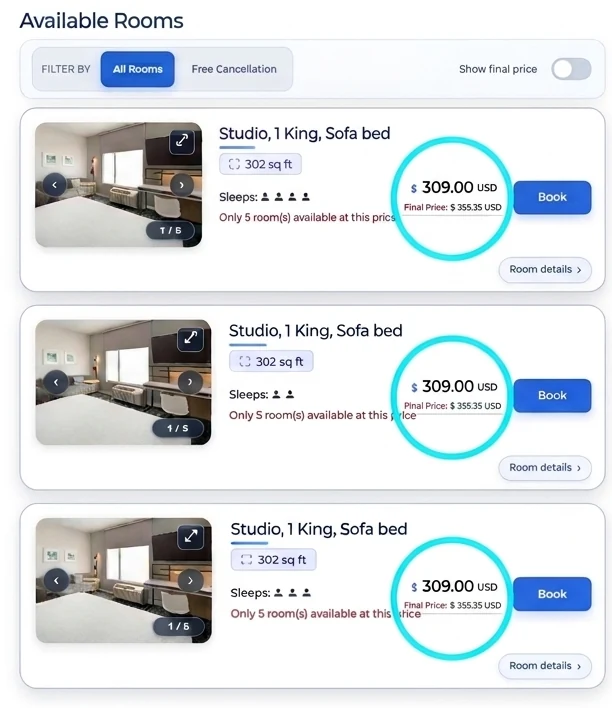
The supplied illustration shows a prominent $309.00 figure beside a smaller final-price label of $355.35. Those are example amounts, not a current hotel quote. The picture does not establish the dates, length of stay or the complete list of included charges. Read it as a reminder to inspect the price description.
Before booking a real offer, open the breakdown and establish what each number represents. Confirm whether it is per night or for the whole stay, which travelers it covers, and whether a mandatory amount is collected separately. The example's room counts and availability messages are illustrative too; they do not describe today's inventory.
The Book buttons shown inside the image are part of the illustration. Use the search form or AI Hotel Finder to check actual offers for your dates.
Illustrative room-pricing example, not live rates or availability. Open full-size image.
Separate mandatory charges, optional extras and deposits
Mandatory charges
Review taxes and required resort, destination or service charges. Check whether each is already included and who collects it.
Optional extras
Breakfast, parking, pets, additional beds and services can cost more unless the selected package explicitly includes them.
Refundable holds
A deposit or incidental card authorization can affect available funds even when it is not a final room charge.
An all-in price is also different from an all-inclusive resort package. Pricing language describes the stated cost; a package describes included services. Do not assume that an all-in room price includes meals, drinks, airport transfers or every hotel facility. Read the benefits attached to the specific room and rate.
For a deposit or card hold, confirm the amount, accepted payment method and release conditions with the hotel. Avoid budgeting only for the prepaid room if additional funds must be available at arrival. The hotel's release process and your bank's processing time can affect when those funds become available again.
Compare equivalent room offers before choosing the lowest total
Match the property name and address first, especially where a brand has several nearby hotels. Then match room type, beds, occupancy and dates. A prepaid nonrefundable room without breakfast and a flexible breakfast offer are different products, even when the room photographs look identical.
Check cancellation deadlines and their time zone, payment timing and any restrictions on changes. Membership or loyalty prices may have eligibility conditions. If one offer includes a service you will otherwise buy, consider that value alongside the total. A lower headline number can become less attractive when the booking conditions do not fit your plans.
Choose the destination and dates. Enter the hotel, landmark, address or place, and confirm the actual travel party.
Match the room and benefits. Compare beds, occupancy, meals and cancellation conditions.
Read the complete price breakdown. Distinguish included charges, separately payable amounts and optional extras.
Review the final booking summary. Save the selected conditions and confirmation for the reservation you make.
Use complete stay pricing for business and leisure trips
For a work trip, record the complete accommodation cost rather than budgeting from the first nightly figure. Check whether your expense process needs a hotel invoice, a payment receipt or both, and confirm how to obtain the required documents. Breakfast, parking and transport costs can also affect the practical choice.
If you extend a business visit into a leisure weekend, compare the extra nights separately. Confirm whether the room, occupancy, cancellation conditions and rate remain the same. Family members joining later can change the room requirement. Keep reimbursable and personal expenses clearly identified instead of assuming the original booking covers the extension.
BusinessHotels.com lets you begin with an exact property or a useful location, including an airport, convention venue or other place. Use the returned offers to build a shortlist, then review the room details and final booking conditions. Our AI Hotel Finder provides another route into hotel search; the selected offer defines the actual stay and price.
Which hotel websites show prices including taxes and fees?
BusinessHotels.com, Google Hotels, Booking.com and Priceline provide pricing information for hotel comparisons. Read the selected offer's breakdown: presentation varies by market and booking flow. Compare the complete stay cost and any separately stated charges payable at the property.
Does all-in hotel pricing include breakfast and parking?
Only if those services are included in the selected offer. Optional breakfast, parking, pets, extra beds and other services may cost more. Check the benefits and eligibility for your actual guests before booking.
Is an all-in hotel price the same as an all-inclusive resort stay?
No. All-in pricing describes the charges included in a stated price. An all-inclusive resort package describes services such as meals and drinks. Read the room offer to see exactly which services and charges are included.
Can a mandatory fee be included in the total but paid at the hotel?
Yes. Inclusion in a quoted total and collection of the payment are different things. Check the amounts due now and at the property so you understand both the complete cost and the payment schedule.
Is a refundable hotel deposit another room fee?
A refundable incidental deposit or card hold is different from the room charge. It can affect your available funds. Ask the property about the amount, accepted payment method, release conditions and possible bank processing time.
How do I compare two hotel booking sites fairly?
Match the hotel address, room category, dates, rooms, guests, currency, breakfast and cancellation terms. Compare complete stay totals, including any separately disclosed mandatory charges, and confirm that no item has been counted twice.
How do I check current prices on BusinessHotels.com?
Use the hotel search form or AI Hotel Finder. Confirm your destination, stay dates and party requirements, then compare the returned offers. Review the complete booking summary, payment schedule and conditions before confirming a reservation.
Are the prices in the article image available to book?
The image is an illustration supplied for this guide. Its prices, room counts and availability messages are examples rather than current offers. Run a hotel search for your dates to check available rooms and pricing.
BusinessHotels.com publishes this independent guide about its own service and other hotel search websites. The comparison explains pricing workflows and does not rank websites by a tested price advantage. Room photographs and the pricing illustration are not bookable offers.
Plan your stayExplore hotel guides and destinations
Find a hotel near your plans, compare room offers, or check a booking detail before you pay.